
AI Chatbot - Nova
ScaleUpProductivity
3.825.74K Reviews
- Version
- Varies With Device
- Installs
- 100.00M
- Age Rating
- Everyone
Screenshots
Our Review of AI Chatbot - Nova
 Analysis by Appyee
I find AI Chatbot - Nova most useful when I treat it as a flexible place to think through a task, rather than as a hands-free replacement for every app on my phone. It is a free productivity app from ScaleUp, built around a conversational AI experience. That makes it appealing if you want help drafting, explaining, or organizing ideas in plain language, but the best choice depends on whether you need conversation or direct control over a specific tool.
What I’d decide before installing
Before adding any AI assistant to my routine, I ask what I actually want it to do. If the job is to turn a rough thought into a clear email, suggest an outline, or explain an unfamiliar subject, a chat-based app can be a convenient starting point. If I need a dependable alarm, a precise calendar entry, or a route that reflects live conditions, I still prefer the dedicated tool designed for that task.
That distinction matters here. Nova is presented as an AI chatbot, and the strongest reason to try it is the ability to ask for help in everyday language instead of learning a complicated interface. I would use it to get a first draft or a list of options, then check anything important before acting on the answer. That small habit keeps the convenience without treating an AI response as automatically authoritative.
A better fit for drafts and decisions
A practical workflow is to give Nova context, a clear goal, and a preferred format. Rather than asking for a vague “good message,” I might explain who I’m writing to, what I need to say, and whether I want the tone to sound warm or direct. I can then review the result, correct details, and ask for a shorter version. The useful part is not simply receiving text; it is having a quick way to explore alternatives and refine one.
For a realistic everyday example, imagine I have a busy morning and need to reschedule a casual appointment while also preparing a short note for a colleague. I could ask for a polite message with the key details I provide, then edit it so it sounds like me. For the colleague’s note, I could request a concise outline first and fill in the facts myself. This is a sensible use of a chatbot: it helps with wording and structure, while I remain responsible for the details and the final send.
That approach is especially helpful when a blank page is the main obstacle. It is less suitable when the task depends on private information, exact current facts, or an action that must happen automatically. I would not assume that a conversational answer has changed a calendar, sent a message, or completed a booking unless I can see that action confirmed in the relevant service.
Getting Acquainted with Nova
Installing AI Chatbot - Nova was a breeze. A quick download, and I was ready to dive in. The interface is sleek and modern, welcoming users with a friendly chat bubble that seems almost eager to help. The app is designed to cater to both Android and iOS users, ensuring that no one is left out of the experience.
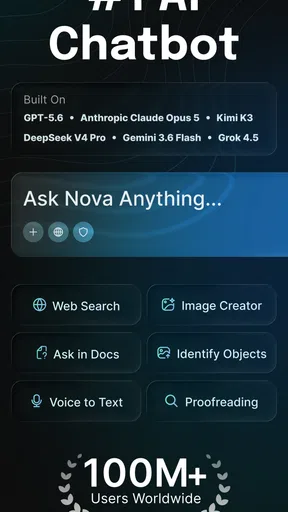
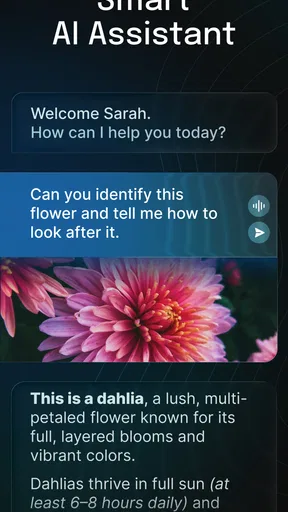
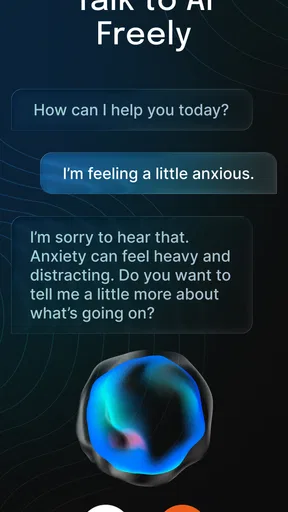
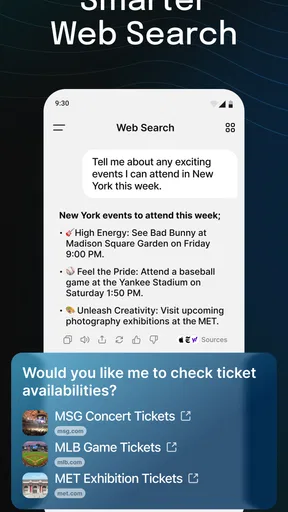
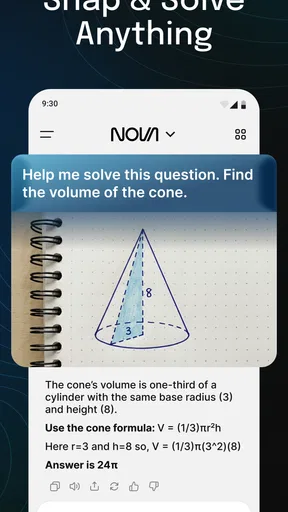
Now, let's talk functionality. Nova is equipped with a robust AI engine that understands natural language, making interactions feel more like chatting with a friend than issuing commands to a machine. The app supports a wide range of queries, from setting up reminders to answering trivia questions. It's like having a personal assistant in your pocket, and trust me, it doesn't disappoint.
Features That Stand Out
The feature set of Nova is quite impressive. One of the highlights is its ability to integrate with other apps seamlessly. Whether it's syncing with your calendar or playing your favorite tunes, Nova handles it with ease. This is a game-changer for anyone juggling multiple apps daily.
Another noteworthy feature is Nova's adaptability. The AI learns from interactions, gradually tailoring responses to suit your style and preferences. Over time, it becomes more intuitive, almost anticipating what you need before you even ask. It's like Nova is getting to know you, and who doesn't like a bit of personal touch?
For those concerned about privacy, Nova has you covered. The app takes user data seriously, offering customizable privacy settings. You can decide what data Nova has access to, ensuring peace of mind while you enjoy the app's benefits.
When a chatbot isn’t the right tool
For quick curiosity, brainstorming, or low-stakes writing, I’d reach for a conversational assistant before opening a full document editor or searching through several pages. But those alternatives still win in their own lanes: a notes app is better for keeping information in a dependable structure, a search engine is often better for locating and comparing original sources, and a dedicated calendar or navigation app is the safer choice when an exact action or live detail matters.
The trade-off is that a chatbot can sound confident even when a response needs checking. I avoid pasting sensitive personal or work details unless I am comfortable sharing them with the service, and I remove names or identifying facts when they are not needed for the task. For medical, legal, financial, or safety-critical decisions, I treat the answer as a prompt for further research, not as a substitute for a qualified person or a trustworthy primary source.
Making the conversation more useful
A few small habits make AI chats more productive. I break a broad request into stages: ask for a plan, choose the parts that fit, then request a draft or explanation for one part at a time. If the first response misses the mark, I say exactly what to change—such as the audience, length, or level of detail—rather than starting over with the same vague prompt. I also check names, dates, calculations, and factual claims before using the result outside the chat.
Another useful trade-off is to keep a clear boundary between brainstorming and record-keeping. Nova can help me shape a to-do list, for example, but I would move confirmed tasks into the system I already rely on rather than assuming a chat is a durable task manager. That prevents a helpful suggestion from being mistaken for a saved reminder. If an answer contains several recommendations, I ask for the reasoning or the assumptions behind them so I can judge whether they match my situation.
The app is free to install, while optional in-app purchases range from under a dollar to just under two hundred dollars per item. I’d start with the free experience and only consider spending if I had identified a particular need that the paid option addressed. The audience rating is Everyone, and its broad reach is reflected in more than fifty million installs. Its average score is 3.8 from around two million ratings, with roughly twenty-five thousand written reviews—a mixed enough picture that I’d try it for my own workflow rather than assume it will suit everyone.
Everyday Use and Performance
So, how does Nova fare in daily use? In short, pretty darn well. I've used it for everything from setting a timer for my pasta to finding the quickest route to a new restaurant, and it's been consistently reliable.
The app's speed is commendable. Responses are snappy, and I haven't experienced any lag, which is crucial when you're in a hurry. The voice recognition is also top-notch, accurately interpreting my less-than-perfect pronunciation on more than one occasion.
Another aspect worth mentioning is Nova's ability to handle complex queries. It doesn't just stop at simple tasks; it can tackle multi-step processes, like booking a table at a nearby restaurant and adding it to your calendar. This level of sophistication is where Nova truly shines.
Choosing whether to stick with it
The main cost of switching to a chatbot is not installation; it is building a habit around a new place for questions and drafts. I would give Nova a fair trial on a handful of repeatable tasks—rewriting messages, generating outlines, or clarifying a topic—then judge whether its answers save enough effort to justify opening it regularly. If I find myself copying every result into another app and correcting too much, a specialist writing tool or my existing notes workflow may be more efficient.
ScaleUp’s app has been available since March 3, 2023, and the large number of people who have installed it suggests that AI chat is a familiar option for many users. That does not mean every person needs another assistant. If you already have a chatbot that produces answers you trust and fits your routine, switching only makes sense if Nova gives you a noticeably better experience for a task you do often. I would compare the quality of the results on the same prompts, not just the first impression of the interface.
Final Thoughts
After spending some quality time with AI Chatbot - Nova, I can confidently say that it's a fantastic addition to anyone's app arsenal. It's functional, reliable, and just plain fun to use. The integration capabilities and learning features make it stand out in a crowded market, and the focus on user privacy is a reassuring touch.
Whether you're tech-savvy or just looking for a helping hand, Nova has something to offer. It's like having a digital sidekick that's always ready to lend a hand, and who doesn't need a bit of extra support in their daily grind?
So, if you're ready to embrace the future of virtual assistance, give Nova a try. You might just find that it's the AI companion you've been waiting for.
Who I’d recommend it to
I’d suggest giving Nova a try if you often need a starting point for writing, enjoy asking follow-up questions, or want to explore ideas without switching between several reference tabs. It may also suit students working through general explanations and busy people who want help making a rough message clearer, provided they check facts and keep private details out of prompts when possible.
I’d skip it if what you really need is a conventional task manager, a guaranteed hands-free assistant, or a source you can cite without checking. People who prefer carefully organized notes may be happier with a notes app, while anyone making a consequential decision should verify the answer elsewhere. For me, Nova is best as a convenient thinking and drafting companion—not the final authority and not a replacement for every productivity tool.
Verdict
Strengths of AI Chatbot - Nova
- User-friendly interface for easy navigation.
- Supports multiple languages for global users.
- Offers customizable response settings.
- Integrates with various apps seamlessly.
- Regular updates improve functionality.
Limitations of AI Chatbot - Nova
- Limited free features; premium needed.
- Occasional response delays experienced.
- Requires stable internet connection.
- Lacks voice interaction capability.
- Privacy concerns with data handling.
Other Releases by ScaleUp
View All
PhotoApp - AI Photo Enhancer
Photography4.2

Plant App - Plant Identifier
Education4.2

Momo: AI Photo & Video Maker
Photography4.4
Similar Picks in This Category
View All
Google Calendar
Google LLC4.6

Google Drive
Google LLC4.3

Google Assistant
Google LLC3.9

Microsoft OneDrive
Microsoft Corporation4.6

Samsung Calendar
Samsung Electronics Co., Ltd.4.1

Microsoft OneNote: Save Notes
Microsoft Corporation4.6
Frequently Asked Questions
What features does the AI Chatbot - Nova offer?
AI Chatbot - Nova offers a range of features designed to enhance user interaction, including natural language processing, voice recognition, and customizable responses. It also integrates with various platforms and supports multiple languages, making it versatile for both personal and professional use.
Is AI Chatbot - Nova compatible with both Android and iOS devices?
Yes, AI Chatbot - Nova is designed to be compatible with both Android and iOS devices. The app provides a seamless experience across platforms, ensuring that users can enjoy its features regardless of their device choice.
Does AI Chatbot - Nova require an internet connection to function?
AI Chatbot - Nova requires an internet connection to access its full range of features, including real-time updates and data processing. However, some basic functionalities may be available offline, providing limited interaction until internet access is restored.
How does AI Chatbot - Nova ensure user privacy and data security?
AI Chatbot - Nova implements robust security measures to protect user data, including encryption and anonymous data processing. The app adheres to strict privacy policies, ensuring that user information is not shared with third parties without explicit consent.
Are there any subscription fees or in-app purchases in AI Chatbot - Nova?
AI Chatbot - Nova offers a free version with basic features, while additional premium functionalities may require a subscription or in-app purchases. This flexible pricing model allows users to choose the level of service that best fits their needs and budget.
